6. Orders and shipping
The golden rule
GetDropFlow never pays for you. You pay for every AliExpress order yourself, on AliExpress. The plugin keeps no payment link.
The Orders page
Open GetDropFlow → Orders. It lists the supplier orders linked to your store orders, with a status filter and a box Only orders that need action (waiting for your payment on AliExpress, failed, or with a note that needs your attention). The buyer's name and address stay in the Magento order.
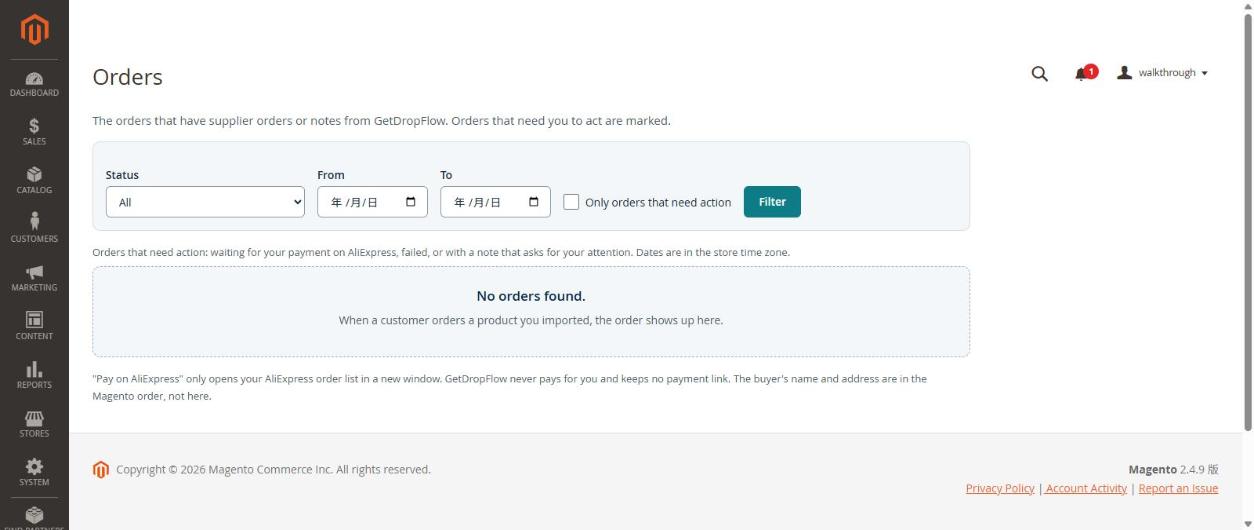
"Pay on AliExpress" only opens your AliExpress order list in a new window.
What the statuses mean
- Delivered — AliExpress shows the order as finished and the parcel as accepted.
- Cancelled — AliExpress shows a finished order that never shipped and was never paid.
- If AliExpress sends a combination the plugin does not recognise, the plugin does not change the status and leaves it as it was. It is better to wait than to show a wrong status.
- Tracking numbers are copied from AliExpress to your Magento order when the parcel has one.
Not checked in this walkthrough (UNVERIFIED): the order synchronisation is switched off by default (setting dropshipkit_orders/general/enabled = 0), so we did not see real orders appear on this page. Reading AliExpress orders and tracking numbers was tested separately with real orders (see the technical notes), but the full screen flow on the Orders page still has to be checked once synchronisation is released.
What was bought, and where to order it
The Products ordered column of the Orders page has one line per product: the colour the customer chose (with the colour's own picture when there is one), the size, the quantity, and an Open on AliExpress link (it opens the product's AliExpress page in a new window, so you can order and pay there). The picture is the one of that colour; without one, no picture is shown, never another colour's. The column is read only and asks AliExpress nothing.
- Hover to enlarge: hold the mouse over a small picture and a larger one appears next to it, so you can see the colour clearly.
- Open the product in your shop: the picture and the name of each product are links to the product's page in your shop (new window). If the product was deleted, disabled or is not visible in the catalog, the name is shown as plain text without a link.
- Announcements: on the right of this page (below it on a narrow screen) there is a column with the GetDropFlow announcements, the same ones as on the Dashboard. When there are none it says "No announcements yet". Mark all as read brings you back to this page. The product search page has the same column.
- Sales > Orders (Magento's own list): a column Product options shows, for each order, the picture, name, quantity, colour and size of its products (hover and click work the same). The column cannot be sorted or filtered. It only reads; nothing in Magento's tables was changed. If you do not want it, hide it with the Columns button of that list.
A failed order: Submit again
When an order has the status Failed and no AliExpress order number yet, a Submit again button appears next to it. First read the reason under Notes and fix it (when AliExpress refuses the delivery address there is a sentence in plain words: check the phone number and the address). Then click the button once: the order goes back in the queue and is sent once in the next synchronisation round (within a few minutes). If AliExpress refuses it again, the order shows as failed again; there is no automatic retry every few minutes. An order that already has an AliExpress order number has no button and is never sent again; the store order number is also sent to AliExpress as the outer id, and AliExpress itself refuses a repeated order within 24 hours. GetDropFlow never pays for you.
Orders that cannot be sent: a buyer tax or ID number
Some countries (at the moment Brazil, Mexico, South Africa, Israel, Argentina, Saudi Arabia and South Korea) ask for a buyer tax or ID number that GetDropFlow does not send to AliExpress yet. An order to one of them is not sent to AliExpress. The reason is one English sentence, A buyer tax/ID number is required for this country (BR) and is not supported in v1; the order was not sent to AliExpress. (code TAX_ID_COUNTRY_UNSUPPORTED). You find it on the GetDropFlow → Orders page, on the row of that order, and in the log var/log/dropshipkit_orders.log. It is not written as a comment on the Magento order: the comments of the Magento order stay empty.
Demonstration tools and order commands
The package contains demonstration tools for testing without AliExpress: the commands dropshipkit:catalog:demo-supplier and dropshipkit:orders:demo-supplier, and a demonstration supplier with sample products. They do nothing unless the setting dropshipkit_core/general/use_demo is 1 (it is 0 after installation). Never set it to 1 in a real store: the plugin would then use made-up products and pretend to submit orders instead of talking to AliExpress. The command dropshipkit:catalog:import is a normal command and imports from AliExpress.
How to see the current value. Open GetDropFlow → Settings: the first row of the License card, "Operating mode", says "Real (AliExpress)" or "Demo (test stores only)". When demo mode is on, every GetDropFlow page also shows a yellow warning at the top: "Demo mode is on. The demo stand-ins are used, so the orders of your shoppers are not sent to AliExpress. For test stores only; in a real store it must be off." The setting itself has no field in the admin on purpose, and bin/magento config:show and config:set do not know it (they answer that the path does not exist). In the database: SELECT value FROM core_config_data WHERE path = 'dropshipkit_core/general/use_demo'; No row, or the value 0, means off.
What makes made-up orders. Shoppers' orders get made-up supplier numbers, and nothing is sent to AliExpress, only when two settings are present at the same time: dropshipkit_core/general/use_demo = 1 and dropshipkit_catalog/demo/license_valid = 1. Neither has a field in the admin. In a real store both must be 0 or have no row at all. To check the second one: SELECT value FROM core_config_data WHERE path = 'dropshipkit_catalog/demo/license_valid';
Order synchronisation is switched off by default (setting dropshipkit_orders/general/enabled = 0). That switch stops only the automatic job. The setting has no field in the admin on purpose, and bin/magento config:set does not know it (it answers that the path does not exist). Whoever looks after your server switches it on in the database with INSERT INTO core_config_data (scope, scope_id, path, value) VALUES ('default', 0, 'dropshipkit_orders/general/enabled', '1') ON DUPLICATE KEY UPDATE value = '1'; and then runs bin/magento cache:flush. The Orders page tells you while it is off. The command bin/magento dropshipkit:orders:run does not look at it: it runs one round when a person starts it by hand. It only creates unpaid orders on AliExpress; you still pay for every order yourself, on AliExpress.
Before you switch order synchronisation on, try it first in a test store.
Shipping prices for your customers
GetDropFlow asks AliExpress for the real shipping price when your customer looks at the cart. Every plan has this, the free plan too. The rule is simple: a product that comes from AliExpress costs what AliExpress charges for shipping, plus the percentage you set (so that you do not lose money when AliExpress changes a price). A product you added yourself uses your own Magento shipping methods.
How the shipping of a cart is worked out The cart is grouped by product. All the variants of one product (sizes, colours) are one question to AliExpress, for the total number of pieces: three pieces of the same cardigan, or one in size M and one in size XL, are one question each time (for 3 and for 2 pieces). Different products are asked one by one and their prices are added up. The delivery time shown is the longest of them. Your markup is added to that total: first the percentage, then the fixed fee, once per order. There is no highest charge: the customer pays what AliExpress asks plus your markup. A cart that holds AliExpress products and products you added yourself cannot be priced together. The customer sees Some items in your cart have to be shipped separately. Please place two separate orders. * (We are still checking with real AliExpress orders whether AliExpress adds up different products of the same seller the same way. Until then they are added up.)
- In Magento open Stores → Configuration → Sales → Delivery Methods and switch on GetDropFlow live shipping (AliExpress). (It is off until you do this.)
- Optionally set a markup or a free-shipping limit.
- Put a product in the cart: the shipping line shows the AliExpress price and delivery time.
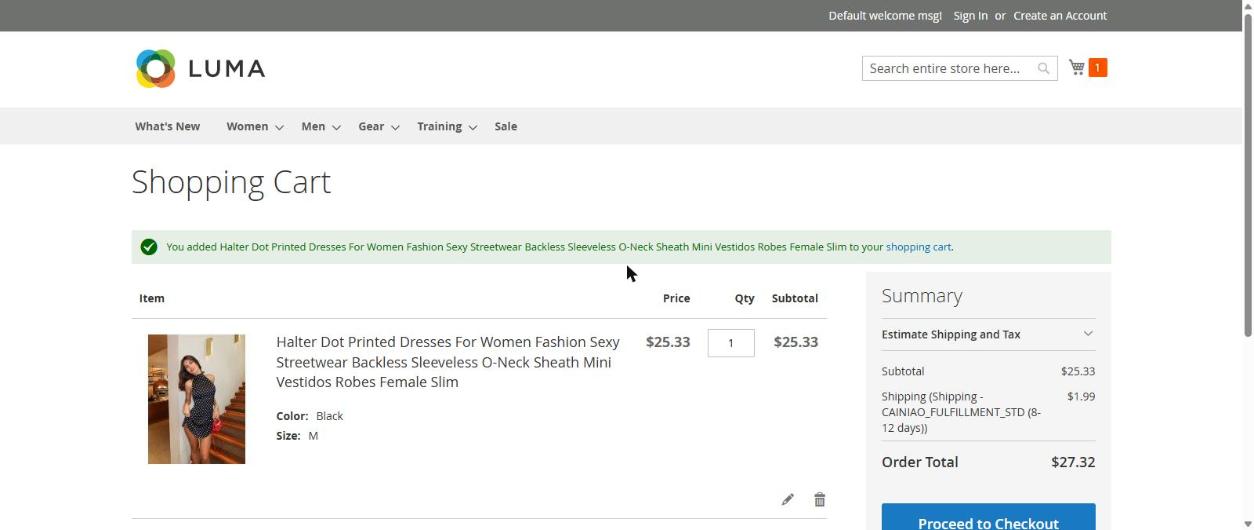
In our test the cart showed CAINIAO_FULFILLMENT_STD (8-12 days) for 1.99 USD. Since version 0.2.0 the same line reads Standard shipping (8-12 days): the plugin turns AliExpress's internal codes into plain names (the picture is from an earlier version).
If AliExpress cannot answer (for example it is limiting requests, or the connection is slow), the customer is not kept waiting: for that product the plugin uses your fixed shipping table by country (the table Fixed charge per product by country (fallback): one row per country with a price, for example United States 5.99). The price of the table is charged once for each product in the cart, not for each piece. If you did not fill that table, no shipping method is offered for that moment. So fill it for every country you ship to. Why the table was used is written to the log of this plugin (var/log/dropshipkit_shipping.log) in a line that starts with GetDropFlow shipping: FALLBACK_TABLE_USED: the product, the reason (for example TIMEOUT, LIMIT:ApiCallLimit, SUPPLIER_ERROR:...) and how many milliseconds the try took. When live shipping is not tried at all (your license is not valid, or could not be read) a line GetDropFlow shipping: LIVE_SHIPPING_OFF says why.
Use a markup so that shipping does not lose you money
AliExpress shipping prices change from day to day, so the price your customer pays at the checkout can end up lower than what AliExpress asks when you place the order. To cover that, set (in Stores → Configuration → Sales → Delivery Methods → GetDropFlow live shipping):
Markup (%) on the AliExpress shipping — a percentage added to the AliExpress price; Fixed handling fee per order — an amount added once per order, after the percentage.
Example: AliExpress says 5.00. With a markup of 10% the price becomes 5.50; with a fixed fee of 1.50 on top it becomes 7.00.
The markup and the fixed fee work only on the live AliExpress price. They are not added to the prices of your fixed shipping table (those are your own numbers). Older versions had a setting Highest shipping charge per order; it is gone, and a value saved by an older version is ignored.
When AliExpress itself ships free
Some AliExpress products are marked as free shipping. For such a product the customer pays 0 at the checkout and you carry the shipping cost (AliExpress charges it when you place the order). The markup and the fixed handling fee are not added to shipping that AliExpress gives free. If the cart has a free product and a product with a shipping price, the prices add up as usual (the free one adds 0). If every product in the cart is free, the customer sees one method, Standard shipping, at 0. Only an explicit "free shipping" answer from AliExpress counts: a shipping fee that merely reads as 0 is ignored, and if AliExpress offers options but none of them has a usable price, the plugin uses your fixed shipping table instead. (Earlier versions had a setting Treat an AliExpress shipping price of 0 as "cannot quote"; it no longer exists, and an old value in your database is simply ignored.)
The yellow notice about the shipping table
Because every plan has live shipping, the fixed shipping table is only the fallback. The yellow notice shows only while live shipping is not available for your store at that moment (for example your license is not active, or its answer could not be read) and the table is empty, or has no charge for some country you sell to. It appears at the top of GetDropFlow → Settings, at the top of the Dashboard, and under Enabled in the shipping configuration. It says, for example: Live AliExpress shipping is not available for this store right now, so your fixed shipping table is used, and it is still empty. Shoppers will see no shipping method at the checkout. Fill in the table in the shipping settings.
What to do: press Open the shipping table, and fill in Fixed charge per product by country (fallback): press Add a country, choose the country in the list, type the price for one product (more than 0, at most two decimals, for example 5.99), and repeat for every country you ship to. Use Remove row to delete a row. Then press Save Config. A country can be in the table only once; if something is wrong, the page tells you what to change and saves nothing. Tables written by hand in earlier versions (for example {"US":"5.99"}) are shown as rows and keep working.
All other countries (optional). If you fill in this price, every country that has no row of its own gets it. You decide whether to fill it: nothing is filled in for you. If you leave it empty, a country that is not in the list gets no shipping method. With a price here the yellow notice goes away, because every country is covered.
Estimate a shipping table for me. Above the table there is a button with this name. It takes one product you have imported, asks AliExpress for the shipping price to US, CA, GB, DE and AU (five questions) and fills the rows with the answers. Nothing is saved: look at the prices, change them, and press Save Config only when you are happy. For a country where AliExpress gave no usable price (it answered 0, did not answer in time, could not ship there, or the daily limit was reached) the row stays empty and says why; a price you had already typed for that country is kept. You can press it 3 times per day (UTC day) for the whole store; after that the page says Today's estimates are used up. Please try again tomorrow, or enter the prices yourself. If AliExpress could not be reached for any of the five countries (for example the connection was down), the page says that the estimate could not be made and that press is not counted. If you have not imported any product yet, the button is off and says Import one product first. For reference only: this is the price at this moment, for this one product. AliExpress will change it later, and different products have different shipping costs. Adjust the prices to your own costs.
A wrong currency or rate. If Currency AliExpress quotes in or Rate to the base currency cannot be read (for example it was written into the database by hand), live shipping cannot be used and the fixed table answers. The note under Enabled then says so: Live AliExpress shipping cannot be used right now. Reason: the currency or the rate in the shipping settings below is not correct, so the fixed charge table is used. Please correct them. If you change Currency AliExpress quotes in to anything other than USD, saving is refused with a sentence that says it must be USD and why: GetDropFlow asks AliExpress for shipping prices in USD, so prices in another currency could not be converted. Leave the field as USD (or empty). A different value that an older version saved does not stop you from saving your other settings; change it back to USD to make the note disappear.
The notice only tells you. It never changes a price, never fills in a table for you, and never changes which other shipping methods are hidden. (Screenshots of this notice were not taken for this article.)
FAQ: the "Place Order" button shows an error sentence in Chinese
Some Magento Chinese language packs translate the Place Order button into a sentence that reads like an error ("对不起,暂无报价可供此订单现在。"). This comes from the language pack, not from GetDropFlow. If you sell in Chinese, check your language pack and correct that translation.