2. First setup: license key and AliExpress
You do this once. It takes about five minutes.
Step 1 — Enter your license key
- Open GetDropFlow → Settings.
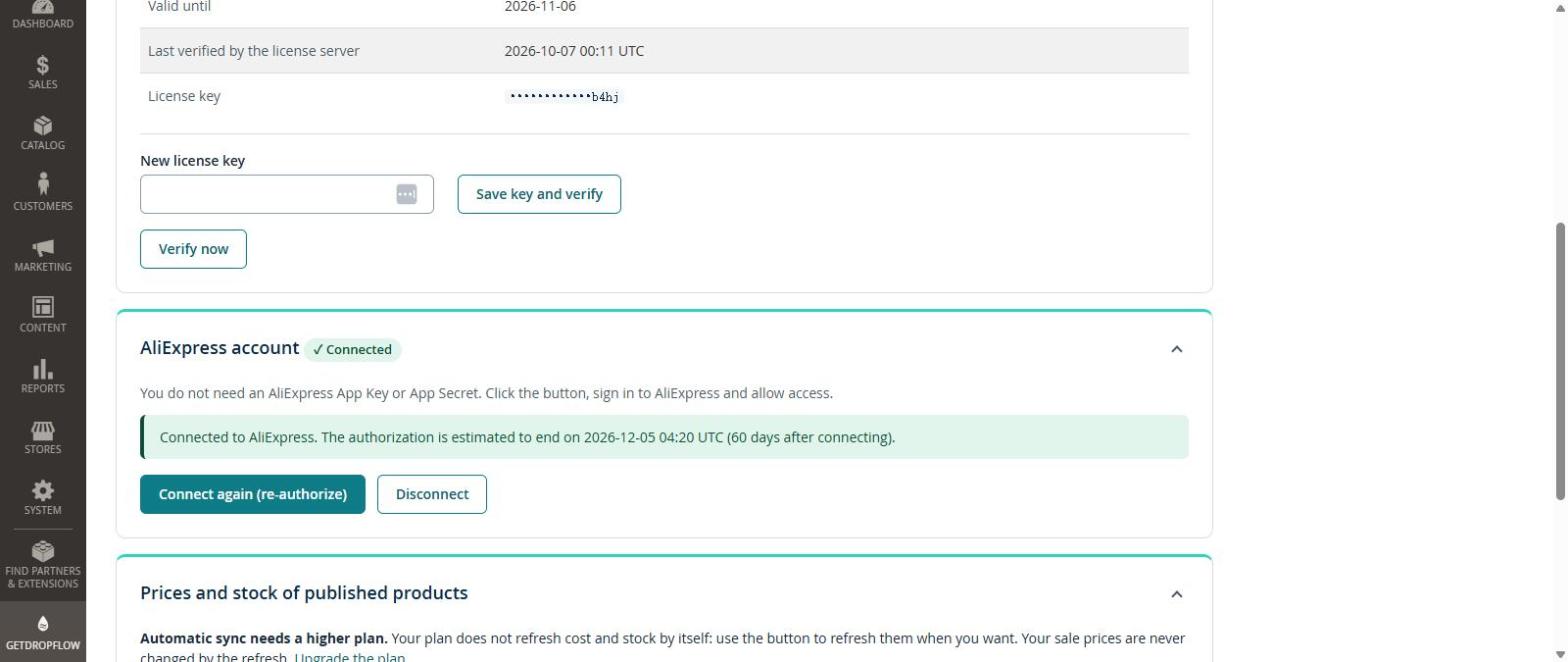
- Paste your license key into New license key and press Save key and verify.
- The key is valid at once: the plugin links your store to the key by itself, you do nothing else. The License box shows Status: Valid, your plan (for example Free plan or Starter plan), the product limit and the date it is valid until.
The Settings page is made of cards you can open and close with the arrow on the right: License, AliExpress account, Prices and stock of published products and Default values.
Until a valid key is saved, the plugin pages are read-only. That is normal.
Step 2 — Connect your AliExpress account
You do not need an AliExpress App Key or App Secret. You only sign in and allow access.
- In the same page press Connect AliExpress account.
- AliExpress opens. Sign in with your own AliExpress account and press Authorize.
- You come back to Magento and see Connected to AliExpress, with the date the permission is expected to end (about 60 days after connecting). Press Connect again (re-authorize) before that date; the page warns you 7 days earlier.
Important: do this in your normal browser (Chrome, Edge, Safari). Do not use a browser window that is controlled by an automation or testing tool: AliExpress may refuse the login there. The plugin never asks for your AliExpress password and never pays for anything.
Step 3 — Look at the defaults
Open the Default values card:
- SKU prefix (letters in front of every product code, for example
DK). - Target country (2 letters, for example
US) — shipping prices are asked for this country. - Sales currency (3 letters, for example
USD) and Exchange rate if your shop currency is not the AliExpress currency. - Enable newly imported products — the safe default is No (review them first).
Press Save default values.
Next
Article 3: find products and publish them.